

- Why Doesn't Google Maps Work in Korea?
- What Is Naver Map?
- New: Passport Verification Makes It Easier for Foreigners
- How Do You Download Naver Map?
- How Do You Switch Naver Map to English?
- How Do You Actually Use Naver Map?
- Beyond Navigation: Booking, Ordering & Local Discovery
- Naver Map vs. Kakao Map vs. Google Maps
- Questions Travelers Ask About Naver Map
- Why Doesn't Google Maps Work in Korea?
- What Is Naver Map?
- New: Passport Verification Makes It Easier for Foreigners
- How Do You Download Naver Map?
- How Do You Switch Naver Map to English?
- How Do You Actually Use Naver Map?
- Beyond Navigation: Booking, Ordering & Local Discovery
- Naver Map vs. Kakao Map vs. Google Maps
- Questions Travelers Ask About Naver Map
You open Google Maps to walk from your hotel to a restaurant, and it just… can’t. No walking directions. No transit routes. No subway exit numbers.
If this has happened to you in Korea, you’re not missing a setting. Google Maps genuinely can’t do most of that here, and almost everyone, tourists included, switches to Naver Map instead.
Naver has also been actively closing the gaps that used to make Korean apps hard for foreign visitors, most recently by letting you verify your identity with just a passport, no Korean phone number required.


Why Doesn’t Google Maps Work in Korea?
South Korea restricts the export of detailed mapping data on national security grounds. Google has never been granted the license it needs to build full turn-by-turn navigation here.
So Google Maps still shows you pins and reviews here. Ask it to get you somewhere, though, and it has nothing. The box below spells out exactly what’s missing.
What Google Maps can’t do in Korea
No walking directions between two points. No driving/turn-by-turn navigation. No bus or subway routing, transfer info, or real-time arrival times. It’s fine for looking up a place’s name, address, or opening hours, but don’t rely on it to get you there.
If Google Maps has never let you down anywhere else, sticking with it here is an understandable habit. It’s still the app we see most foreign visitors open around Gangnam, Seoul City Hall and Jongno.
That habit is what leaves people standing outside a subway station with no route, no arrival time, and no idea which of a dozen exits to take.
Naver Map fixes all three at once: route, arrival time, exit number.
What Is Naver Map?
Naver Map is a free app built by Naver, the company behind Korea’s most-used search engine and the Papago translator. Naver itself describes it as “an all-in-one platform for discovering places, getting personalized recommendations, and finding the best routes across Korea.”
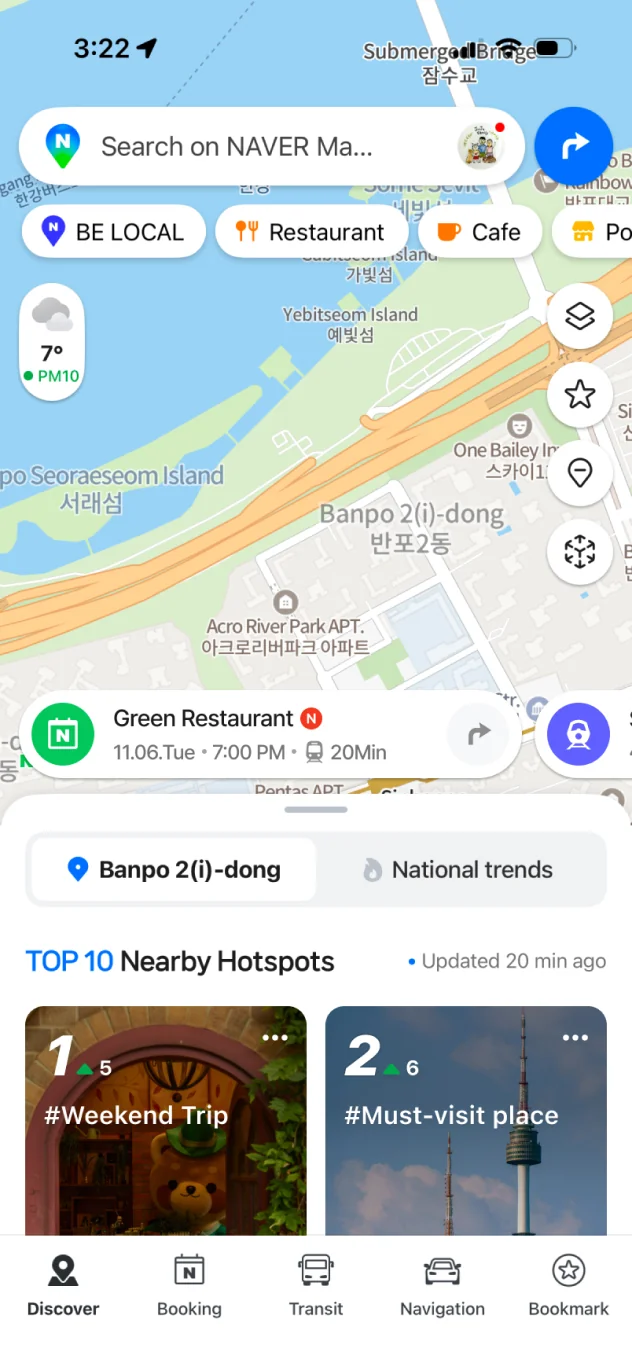
In practice, that means walking, driving, and cycling directions, full public transit routing with live bus and subway arrival times, subway exit numbers down to the digit, indoor AR navigation inside large buildings and malls, and business hours and reviews for almost anywhere you’d search.
The indoor navigation deserves its own mention. It’s a real gap Google Maps can’t touch here.
Naver’s 3D Spatial Information tech delivers “realistic 3D street views and seamless indoor AR navigation for more intuitive and easier wayfinding”. Point your phone down a mall corridor or through a station transfer, and an arrow overlays the camera view showing which way to walk.
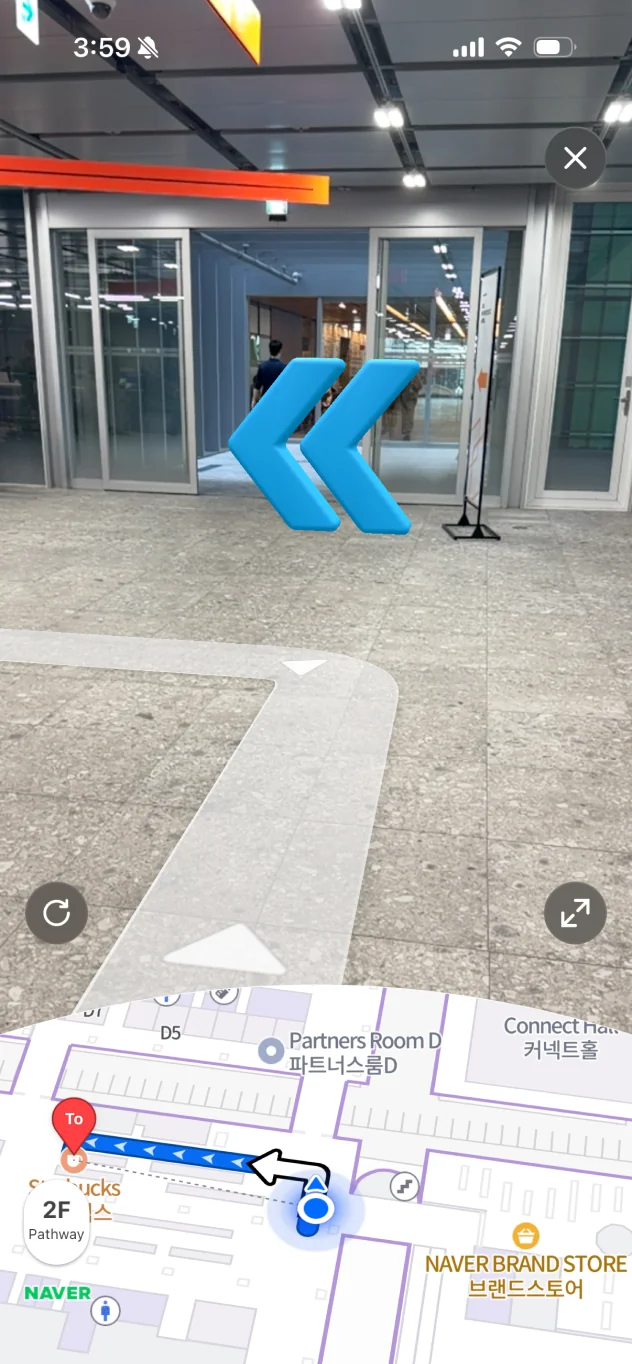
Naver Map is the app locals actually use, which also means it’s the one with the most accurate, up-to-date information. It’s available on the App Store, Google Play, and as a website at map.naver.com.
Bottom line
If you’re getting around Korea on foot, by subway, or by bus, Naver Map isn’t optional the way a map app might be in other countries. It’s the tool almost every trip depends on.
New: Passport Verification Makes It Easier for Foreigners
One of the biggest hidden obstacles for foreign travelers using Korean apps has always been the same thing: most useful features are locked behind a Korean phone number. As of June 2026, Naver has started removing that barrier for its map app.
With Passport Verification, you can now confirm your identity using just your passport, directly on your phone, with no Korean mobile number and no need to contact customer support.
Book and pay more easily and safely with your passport!
Enjoy your Korea trip together with Naver.
Once verified, that same identity unlocks NAVER Booking, NAVER Order, and Naver Pay inside the map app, so you can reserve a table, order ahead, and pay, all from the app you’re already using to find the place.
Naver has also been expanding language support in phases: user reviews on Naver Map are already translated into English, Chinese, and Japanese, and a multilingual Naver Map Guide has provided travel guidance since December 2024.
Why this matters for your trip
Needing a Korean phone number used to be the point where a lot of useful Korean apps stopped being usable for short-term visitors. Passport verification is Naver directly addressing that, so it’s worth checking for the option next time you’re prompted to verify your identity in the app.
How Do You Download Naver Map?
- Search “Naver Map” (or “NAVER Map”) in the App Store on iPhone, or Google Play on Android, or use the download buttons above.
- Install it like any other app; no Korean phone number or account is required to use the core map and navigation features.
- Open the app once before your trip and allow location access, so it’s ready to use the moment you land.
How Do You Switch Naver Map to English?
Naver Map ships with an English interface, but it doesn’t always default to it depending on your phone’s region settings. Switching it over takes under a minute:
- Open the Naver Map app and tap the menu icon (the three lines, usually in a corner of the main screen).
- Go to Settings.
- Find the Language option and select English.
- The app switches immediately: menus, search results, and turn-by-turn directions will now show in English.
Search still works in English
Even before switching, you can usually search for well-known place names in English (hotel names, landmarks, station names) and Naver Map will find the right result. It’s the interface labels that need the language switch.
How Do You Actually Use Naver Map?
Once it’s installed and set to English, using Naver Map day-to-day is straightforward:
- Search by name or address: type a landmark, restaurant, or hotel name and pick it from the results, then tap Directions.
- Pick your mode: walking, driving, or public transit (bus + subway combined), each with its own estimated time and step-by-step route.
- Check subway exits: Naver Map tells you the exact exit number to take, which matters at large transfer stations with a dozen-plus exits.
- Read reviews in your language: many listings show reviews translated into English, Chinese, or Japanese, so you don’t need to guess what a Korean-only review says.
- Save places you plan to visit: bookmark them before your trip so you’re not re-searching the same address every day.
- Download offline maps for your region if you’re worried about data, a useful backup if you’re relying on a limited SIM card or eSIM data plan.
Beyond Navigation: Booking, Ordering & Local Discovery
Naver Map isn’t just a navigation app. It’s the front door to Naver’s wider local business ecosystem, called NAVER Place.
Search a restaurant or café and the listing does more than show an address. Real-time business hours. Photos and videos from verified visitors. A waitlist or reservation through NAVER Booking. Pickup orders through NAVER Order. All without leaving the app.
Foreign visitors can use the booking and ordering features too. They need passport verification, not a Korean phone number.
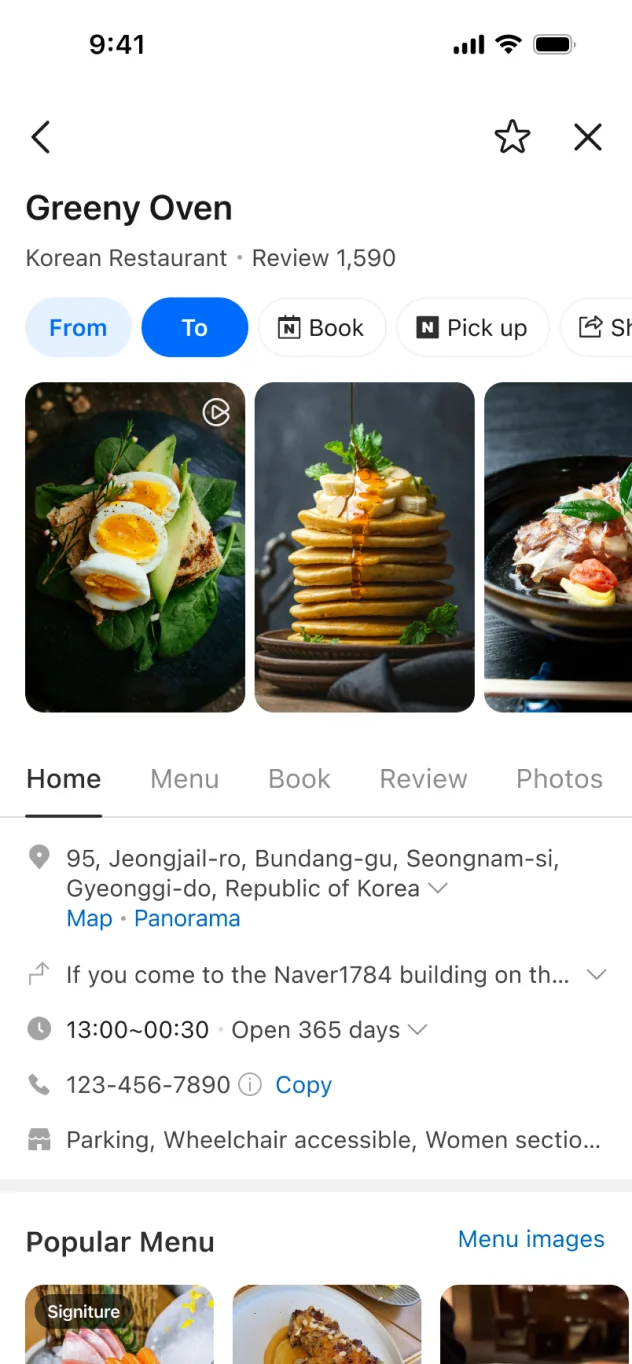
Naver also periodically runs campaigns aimed specifically at foreign travelers to surface spots beyond the usual tourist strip.
As one example, its 2026 “BE LOCAL” campaign, run with Busan Metropolitan City and the Korea Tourism Organization, curated roughly 300 neighborhood spots across Seoul and Busan (including Haeundae, Seomyeon, and Gijang) behind a dedicated tab for non-Korean-language app users, with discount coupons at local restaurants, including some MICHELIN-selected ones.

That particular campaign has since ended, but it’s a good sign of where Naver is investing: Naver reported a 16.4% jump in users with a non-Korean language setting (April 2026 vs. September 2025), and says more region- and language-specific features are on the way. It’s worth glancing at the app’s home tab for a currently-running promotion before you assume there isn’t one.
Naver Map vs. Kakao Map vs. Google Maps
| App | Walking / Driving Directions | Transit Routing | English Support | Best For |
|---|---|---|---|---|
| Naver Map | Yes | Yes, with live arrivals | Yes (manual switch, translated reviews) | Most travelers, the all-round default |
| Kakao Map | Yes | Yes, strong subway diagrams | Limited | Subway-heavy trips, as a secondary app |
| Google Maps | No | No | Yes | Looking up names, addresses & reviews only |
Kakao Map is a solid app and plenty of long-term residents use it alongside Naver Map, particularly for its subway line diagrams. But for a first-time visitor who only wants to install one navigation app, Naver Map’s combination of English support, translated reviews, passport verification, and complete walking/transit coverage makes it the one to start with.
Questions Travelers Ask About Naver Map
Yes. Switch it under the app’s menu → Settings → Language → English. Place search works in English even before you switch, and many reviews are already translated into English, Chinese, and Japanese.
Yes, it’s free to download and use, with no Korean phone number or payment required for navigation.
Not anymore for identity verification. Naver introduced passport verification in June 2026, letting foreign visitors verify their identity without a Korean mobile number to unlock booking, ordering, and payment features.
For most trips, yes. Google Maps can’t provide walking, driving, or transit directions inside Korea, so you’ll want Naver Map (or Kakao Map) as your actual navigation app.
Start with Naver Map for its more complete English support. Add Kakao Map later only if you find yourself wanting its subway diagrams as a second opinion.
You can download maps for offline use, which is a useful backup if you’re on a limited data plan, though live transit arrival times and features like Booking or Order need a connection.
Related: see our full Korea travel apps guide for transit payment, translation, and emergency apps, or head back to Korea Maps for quick links to Google Maps and Kakao Map.



Comments
Leave a comment